KineMaster - Video Editor
- 4.4
- Rating
- 500.00M
- Installs
- Free
- Price
 Analysis by App-foxy
I have used KineMaster as a mobile video editor, and my first impression is that it aims much higher than a basic clip-trimming tool. It is built for people who want to assemble footage, add sound, place text, and make deliberate editing choices without moving to a desktop program. That makes it interesting for short-form creators, students, families, and anyone who wants more control than a phone gallery usually provides.
The app sits in the video players and editors category and comes from KineMaster, Video Editor Experts Group. It is free to install, rated for Everyone, and works on devices running Android 8.0 or later. Its broad reach is easy to understand: it has passed 500 million installs, with a 4.4 average from around 6.1 million ratings. Those figures do not automatically make it the right editor for every person, but they do suggest that the workflow has proved useful to a very large mobile audience.
What I found when editing with KineMaster
I found that KineMaster’s timeline is most useful when I plan the edit before adding polish: choosing the story’s strongest moments first makes later decisions about text and sound much easier. I’ll also look at how its current version fits into an established workflow, and what I’d check before relying on it for a larger project.
In-Depth Coverage of KineMaster - Video Editor
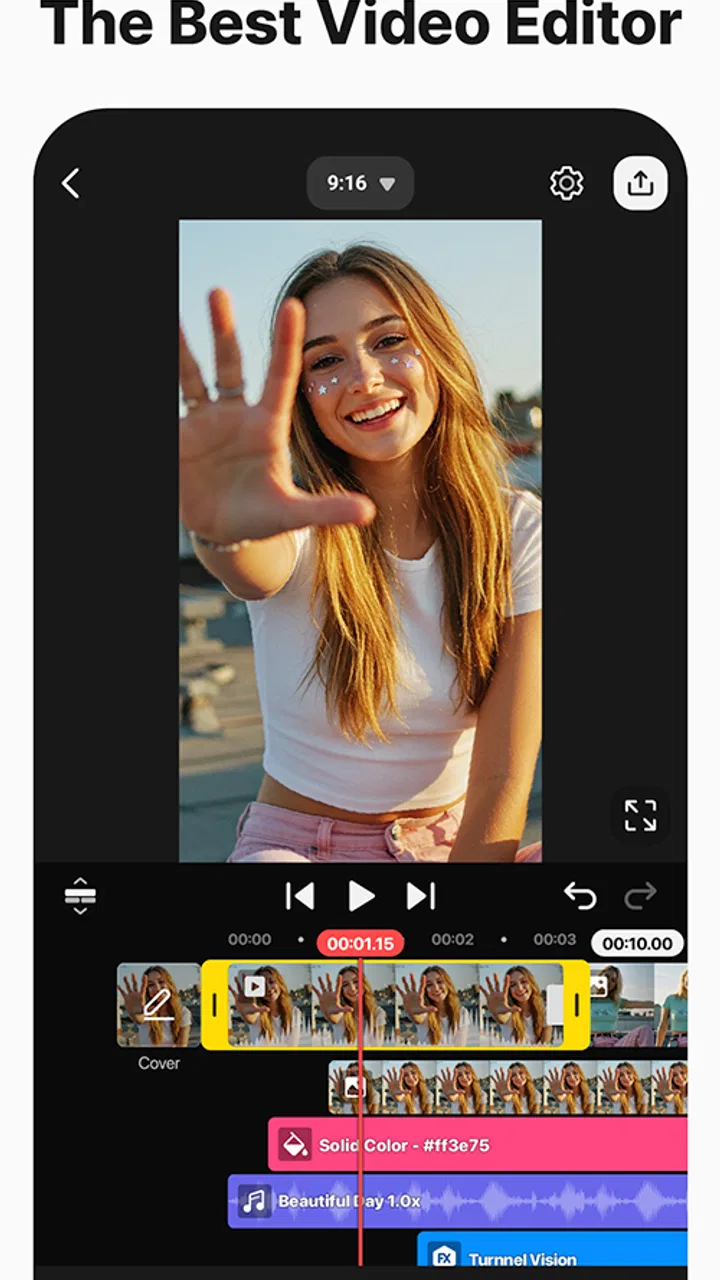
A timeline that feels more serious than a phone gallery
The central appeal is the timeline. Instead of treating a video as one fixed item, the app lets me think in separate pieces: the main footage, supporting visuals, titles, music, and other adjustments can be arranged with much more intention. That matters when a project needs a clear opening, a pause before a joke, a reaction shot, or a closing message rather than simply being shortened from beginning to end.
I found this especially useful when preparing a short family video. I could remove the slow parts, keep the strongest moments in order, and place a title where it actually helped the viewer understand the scene. The process still depends on a small touchscreen, so precision takes patience, but the timeline gives enough structure to make editing feel planned instead of improvised.
Useful for more than social clips
Many mobile editors are designed around instant templates or automatic effects. KineMaster is better suited to someone who wants to make the decisions personally. A creator can work on a vertical clip for a social feed, a landscape video for a larger screen, a school presentation, a birthday montage, or a simple tutorial. The same basic editing approach adapts to each situation.
That flexibility is one of its strongest qualities. I do not have to change my entire way of thinking just because the project changes from a casual clip to something more carefully arranged. The app encourages a sequence of small choices: where a cut should happen, how long a title should remain visible, whether background audio should support or distract from speech, and which moments deserve emphasis.
The free starting point and the paid question
KineMaster is free, which makes it easy to test before deciding whether it deserves a regular place in your workflow. There are in-app purchases ranging from $0.99 to $77.77 per item. Because those purchases cover different options and levels of access, I would not treat the free installation as proof that every editing capability is included without payment. The sensible approach is to build a small project first, then check whether the tools you actually need are available under the free experience.
This distinction is important. A free editor can be excellent value if your projects only need straightforward cutting, text, and basic audio work. It becomes a different calculation if you are producing videos frequently and depend on premium tools, additional assets, or a cleaner publishing workflow. I would judge the paid value by repeated use, not by unlocking everything immediately.
How I would organize a first project
My advice is to begin with the story rather than the effects. Import the strongest footage, place it in a sensible order, and remove pauses before adding decoration. Once the sequence works without music or titles, add those elements one at a time. This prevents a common mobile-editing problem: spending time making individual shots look exciting before noticing that the whole video feels too long or confusing.
I also recommend keeping a duplicate version before making a major change. Touch editing is convenient, but it is easy to trim the wrong section or alter a clip while experimenting. A staged workflow gives me a safer way to compare versions and return to the earlier arrangement when an effect or timing choice does not work.
Audio deserves more attention than most beginners give it
Viewers will often forgive a simple visual style, but uneven sound is immediately tiring. When I edit a spoken clip, I listen for the voice before worrying about transitions. Background music should support the scene, not compete with the person speaking. If a song makes the words harder to follow, lowering its presence or removing it is usually a better decision than adding another visual effect.
This is also where KineMaster can reward careful users. The timeline makes it practical to treat audio as part of the structure rather than as an afterthought. I can decide when music should begin, when it should give way to dialogue, and when silence creates a stronger ending. Those choices are not flashy, but they are what make a short video feel finished.
You May Also Like

 AccuWeather: Weather Radar
AccuWeather Review: A Quick, Clear Forecast for Everyday Decisions
For everyday plans, the best forecast is the one you can understand quickly. AccuWeather makes rain timing, radar, and local conditions easy to act on, with a few trade-offs.

 Hill Climb Racing
Why Hill Climb Racing Still Turns Crashes Into One More Run
A tiny car, a bumpy hill and one more upgrade: Hill Climb Racing keeps resurfacing because its simple chaos makes every near-miss feel personal.

 AliExpress - Shopping App
AliExpress Makes Global Shopping Feel Personal, but Shoppers Bear the Risk
AliExpress turns a global marketplace into a pocket-sized discovery engine. Its reach is useful, its shopping loop compelling, and its trade-offs easy to miss.

 Lords Mobile: Kingdom Wars
Lords Mobile Is a Kingdom-Building Routine, Not a Quick Match
A case-by-case verdict on the building, battles, device demands, and social commitments that make Lords Mobile rewarding for some players and exhausting for others.

 PDF Scanner app - TapScanner
TapScanner Makes Paperwork Easier to Capture, Check, and Share
TapScanner makes scanning with a phone feel less like a rescue operation and more like a dependable step in getting work done. Its capture tools are useful, though not flawless.

 Block Blast!
Block Blast! Shows How Much a Puzzle Game Can Leave Out
A quiet grid game shows why puzzle players increasingly value instant clarity, repeatable skill and low-pressure play—and where the genre still needs to catch up.
More From Our News Desk
View All News


Text, timing, and readable presentation
Text overlays are useful for names, explanations, captions, and calls to action, but they need restraint. I prefer short phrases that can be read comfortably while the footage continues. A title that appears too late or disappears too quickly may technically be present yet still fail its purpose. Checking the finished video at normal speed is more reliable than judging the title while paused on the editing screen.
For a school project or a how-to clip, I would use text to clarify the next step rather than repeat every spoken sentence. For a personal montage, a few location or date notes can add context without covering the important part of the image. The app gives me room to make those choices, but it cannot decide whether the words are necessary. That editorial judgment remains with the person editing.
Where it compares well with simpler alternatives
Compared with the editor built into a phone’s gallery, KineMaster offers a more deliberate workspace. A gallery tool is often faster for one quick trim, but it becomes limiting when I want several layers of information or a carefully timed sequence. KineMaster is the better choice when the video has a beginning, middle, and end that need shaping.
Compared with template-driven social apps, it gives me more control and less dependence on a preset style. Templates are convenient when speed matters more than originality. KineMaster makes more sense when I want the pacing, text placement, and sound decisions to belong to my project rather than to a ready-made format.
Desktop editors still have advantages for long productions, extensive media libraries, detailed audio work, and mouse-and-keyboard precision. I would not choose a phone editor for a complex documentary or a large multi-hour project if I already had access to a capable computer. The mobile advantage is convenience: I can work close to the footage, make a useful edit away from a desk, and finish a practical video without transferring everything first.
Three workflow lessons that make a real difference
One useful technique is to edit in passes. In the first pass, I remove unusable footage. In the second, I improve rhythm and order. In the third, I handle text and sound. This is faster than repeatedly polishing a clip that may later be removed, and it keeps creative decisions separate from cleanup.
A second lesson is to design for the final viewing situation. A vertical project watched on a phone needs different framing from a landscape project shown on a television or classroom display. I check whether faces, signs, and important objects remain visible after the frame is shaped for its destination. A technically correct edit can still feel careless if the subject sits too close to an edge.
A third is to keep effects subordinate to meaning. When an effect attracts attention away from the speaker or the key action, it is working against the video. I use transitions to connect related moments, not to announce every cut. This approach makes the result look more confident and also reduces the time spent trying to rescue weak footage with decoration.
What may frustrate new users
The freedom that makes the editor useful also creates a learning curve. Someone expecting a single button that automatically turns a group of clips into a polished story may find the process slower than anticipated. KineMaster asks the user to make choices, and those choices take time. The app is approachable, but it is not the same as an automatic montage generator.
Touchscreen editing has practical limits too. Fine adjustments can feel fiddly on a small display, especially when a project contains many short clips or several overlapping elements. I would be more comfortable building a detailed project on a larger phone or tablet than on a compact screen. That is not a flaw unique to this app, but it affects how enjoyable the workflow feels.
There is also a risk of overbuilding. Because the editor provides room for layers, titles, and effects, beginners may add more than the story needs. My best results came from deciding what the viewer should notice first and removing anything that competed with that goal. The app gives control; it does not guarantee good taste.
Who will get the most value
I would recommend it to a creator who wants to publish regularly from a phone and is willing to learn a hands-on workflow. It suits short tutorials, product demonstrations, travel recaps, family videos, school assignments, and social clips where timing matters. It is also a good stepping stone for someone who wants to understand editing concepts before moving to a desktop application.
It can be particularly valuable for people who do not want their videos to look like every other template-based post. The ability to arrange the story personally is more important than having a long list of automatic styles. If you enjoy adjusting the rhythm of a clip and listening carefully to the result, you are likely to appreciate what the app offers.
I would be more cautious about recommending it to someone who only needs occasional trimming. If your usual task is cutting the beginning and end of a recording, the phone’s built-in editor may be quicker and less demanding. I would also point a professional editor toward a desktop workflow when projects involve extensive organization, precise sound mixing, or long-form production.
Device expectations and staying current
The minimum requirement is Android 8.0, and the current version is 8.0.14.36002.GP. Meeting the operating-system requirement does not make every device equally comfortable for editing. Screen size, available storage, processing capability, and the amount of footage on the phone can all affect the experience. Before starting an important project, I would make sure the device has enough working space and avoid filling the timeline with unnecessary copies of the same clip.
I also prefer to finish a small test project after an update before committing to a large one. That habit lets me confirm that my usual workflow still feels familiar and that the device handles the kind of footage I normally use. It is a simple precaution for any editor that becomes part of a regular publishing routine.
My value judgment after using it
The free entry point is the main reason I think KineMaster deserves a trial. You can discover whether its timeline and hands-on approach suit you without paying at the start. The paid side requires more personal judgment because the in-app purchase range is broad. I would spend only when a specific recurring need justifies it, such as a tool or asset that improves projects I already make often.
Its value is strongest when it replaces several small tasks: trimming footage, arranging a narrative, adding readable text, shaping audio, and preparing a finished mobile video in one place. If I use those capabilities every week, the time saved can matter more than the novelty of individual effects. If I open the app once every few months, the learning curve may outweigh that benefit.
The large audience is reassuring, and the 89 thousand reviews alongside the rating show that many people have taken the time to assess it. Still, popularity should not replace a personal test. Editing habits vary widely, and the right choice depends on whether you want control or automation, mobile convenience or desktop precision, and a free basic workflow or paid additions for more regular production.
My final recommendation
KineMaster is a strong choice for hands-on mobile video editing, especially when a simple trim is not enough and a desktop editor feels excessive. I like it because it lets me shape the story instead of forcing me into a preset. Its weaknesses are equally clear: detailed work can be fiddly on a small screen, beginners may need time to learn the workflow, and the free-versus-paid value depends on which tools a person actually needs.
I would install it if I were making social videos, tutorials, school work, or personal montages and wanted more control than a gallery editor provides. I would skip it for one-off trimming, automatic slideshow creation, or demanding long-form production better suited to a computer. For everyone in between, the best decision is to create one modest project, edit it in separate passes, and see whether the timeline feels helpful rather than burdensome.
After that test, the choice becomes fairly simple. Keep using the free experience if it covers your regular work. Consider an in-app purchase only when it solves a repeated problem. That makes the app’s cost easier to judge and keeps the decision connected to real value instead of a vague promise of having more features.
FAQs for KineMaster - Video Editor
01What features does KineMaster offer for video editing?
KineMaster provides a comprehensive suite of video editing tools, including multi-layer editing, blending modes, chroma key, audio filters, and more. Users can add text, images, and special effects to their videos, making it ideal for both amateur and professional creators. The app also supports high-resolution exports up to 4K.
02Is KineMaster suitable for beginners?
Yes, KineMaster is designed to be user-friendly for beginners while still offering advanced features for experienced editors. The intuitive interface simplifies the editing process, and there are numerous tutorials available to help new users learn the ropes quickly. This makes it an excellent choice for anyone starting out in video editing.
03Does KineMaster have a free version?
KineMaster offers a free version, which includes many of its core features. However, the free version applies a watermark to exported videos and includes ads. To remove the watermark and access additional premium features, users can opt for the subscription-based KineMaster Premium.
04What are the system requirements for installing KineMaster?
KineMaster is compatible with a wide range of Android and iOS devices. However, for optimal performance, it's recommended to use a device with at least 3GB of RAM and a powerful processor. This ensures smooth editing, especially when working with high-resolution footage or complex projects.
05How does KineMaster handle video exports and sharing?
KineMaster supports video exports in resolutions up to 4K, allowing for high-quality output. Users can export videos directly to social media platforms like YouTube, Facebook, and Instagram, or save them to their device. The app also offers customizable settings for frame rate, bitrate, and resolution, ensuring flexible sharing options.
Pros
- Intuitive user interface for easy editing.
- Wide range of video effects and transitions.
- Supports multiple layers of video and audio.
- High-quality export options available.
- Frequent updates with new features.
Cons
- Watermark on free version exports.
- Some features locked behind a paywall.
- Can be resource-intensive on older devices.
- In-app ads can be intrusive at times.
- Limited text customization options.

KineMaster - Video Editor
Gallery